How To Add Story Highlights On Instagram:
Method 1: Adding Your Current Story to a Highlight
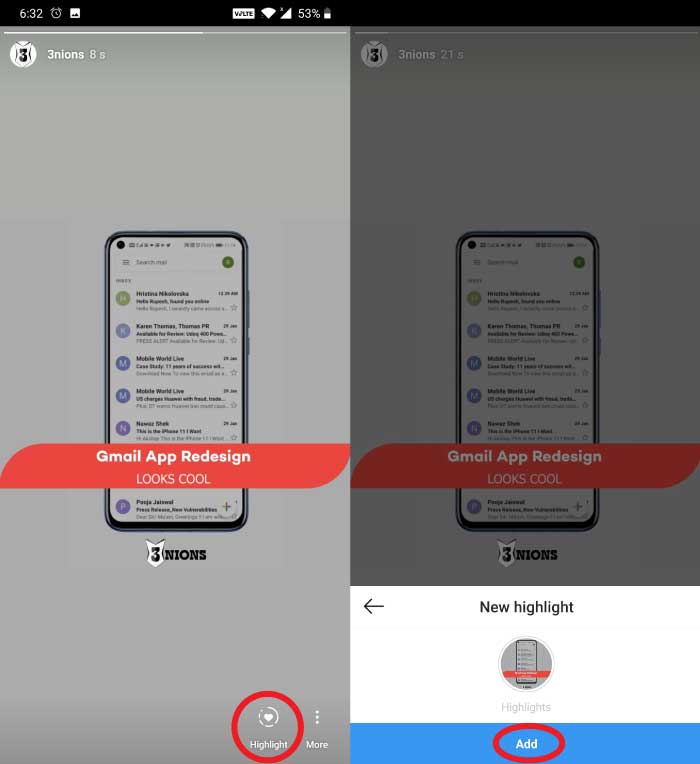
Open your Instagram (If you don’t have one, you can download it from here).
Then go to “Your Story” by tapping on your profile picture, either in the story row, on the feed tab or on your profile picture itself.
Now, select the image or video you want to upload and send it to your story by tapping on the blue button from the bottom right corner.
Once your story is uploaded, go back to it and you will find a “Highlight” option on the bottom of your screen. Tap on it, and you will get two other options, first is “New”. And in the second option, you will see other story highlights created by you. So, tap on them and add your new story to it. Or if you haven’t made any story highlight(which is why you are reading this article), then tap on “New”, add a name to your highlight and then confirm your process by tapping on the blue “Add” button. That’s it your new story light will be added to your profile now.
Method 2: Creating a Highlight from the Stories Archive
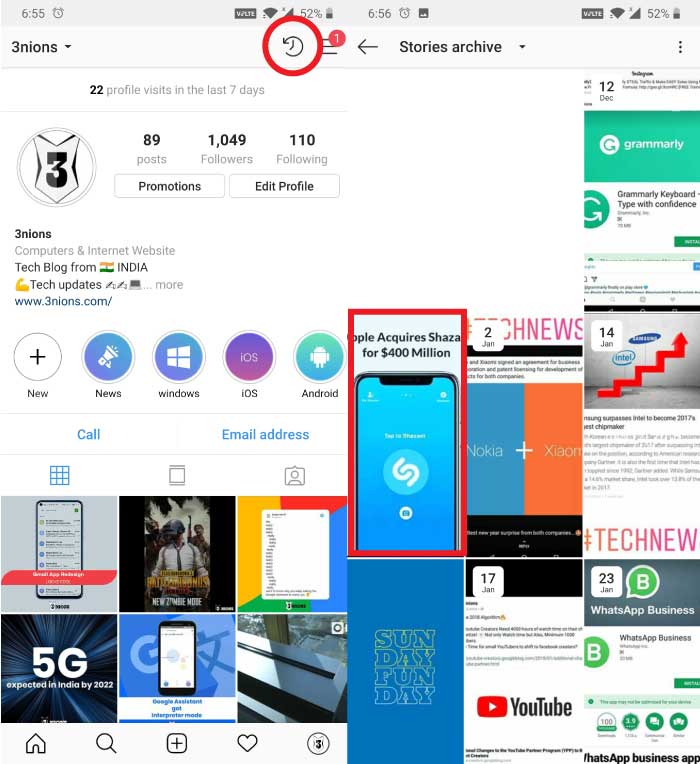
Open your Instagram (If you don’t have one, you can download it from here).
Now, go to your profile and tap on the clock like icon from the top right corner. (This is your archive section).
Once opened, you will see the stories that you would have uploaded in the past.
Now tap on the story that you want to add as a highlight, and then you will find the “Highlight” option from the bottom of your screen. (You can select as many images or videos as you want).
Now again, tap on “New” if you want to make a new highlight or tap on your existing ones and then simply add your archive story to your highlight. And that’s it your past story now, will get added to the story highlights.
So, here are the two methods through which one can easily add story highlights on Instagram without any hassle. Now, according to your preference, you can either add a story to highlight within 24 hours (until your story disappears). Or if it disappears, then also you can add it to highlights by going to your archive section. But if you want to delete your story highlight for any reason, then go to your profile, do a long press on the highlight that you want to delete and you will find the “Delete” option. Tap on it, and that’s it your story highlight will get deleted.Sponsor ads:
Gihosoft Free iPhone Data Recovery:iphonerecovery.com
Free iPhone Data Recovery Software for Windows/Mac
Recover up to 12+ types of files, including contacts, SMS, photos, WhatsApp, Viber, notes, etc.
Restore lost data from iOS devices directly or from iTunes and iCloud backup
Recover iPhone data lost due to iOS upgrade/jailbreak, accidental deletion, device lost or broken
Support all the latest iPhone, iPad and iPod Touch
Both Free and Pro version.
If you lost data after you updated to a new iPhone, you can always use Gihosoft iPhone Data Recovery to get the data back from the old iPhone or backup.
Top 10 Best FRP Bypass Tools to Bypass Google Account on Android Device 2019
Worth reading:download youtube 1080p
Jihosoft Android Data Recovery: the best Android Data Recovery software for Windows and Mac to recover deleted contacts, messages, photos, videos, WhatsApp and etc from Android
If you use android phones, please choose Gihosoft Android Data Recovery

Nema komentara:
Objavi komentar